NewAdvertise is free on every plan

BuddyBoss Platform

Native app screens for your BuddyBoss Platform site

BuddyBoss Platform is built from BuddyPress, and Memberside reads it the same way: the activity feed, members, groups, connections, messages, profiles and notifications as native screens, arranged on a canvas you control.

Reads the BuddyBoss Platform you already run. Nothing to migrate.

Free while in beta. No credit card needed.
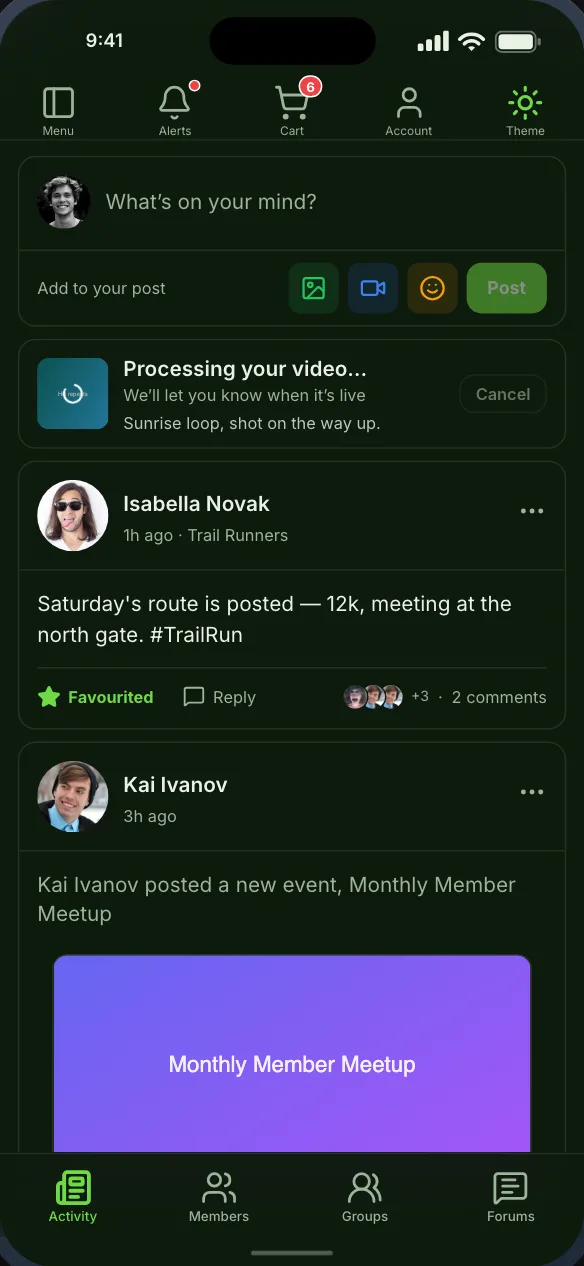
The BuddyPress activity stream, with the post composer, favourites and replies

In the app

What BuddyBoss Platform becomes

Native screens, drawn by the app from your site’s data, that you place on the bottom bar, the top bar or the side drawer.

Activity feed

Sitewide or scoped, with favourites and nested replies. Members post from the app, video included.

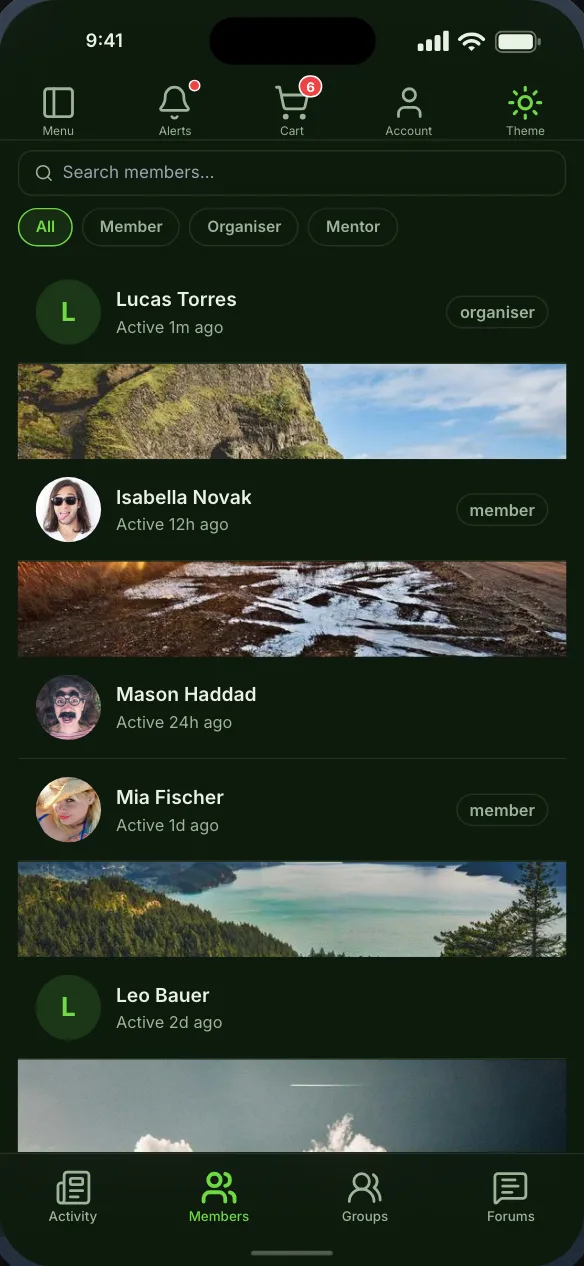
Member directory

Profile details on each card, profile-field filters, sorting, search and member types.

Profiles

Profile field groups with every field type, per-field privacy and conditional fields.

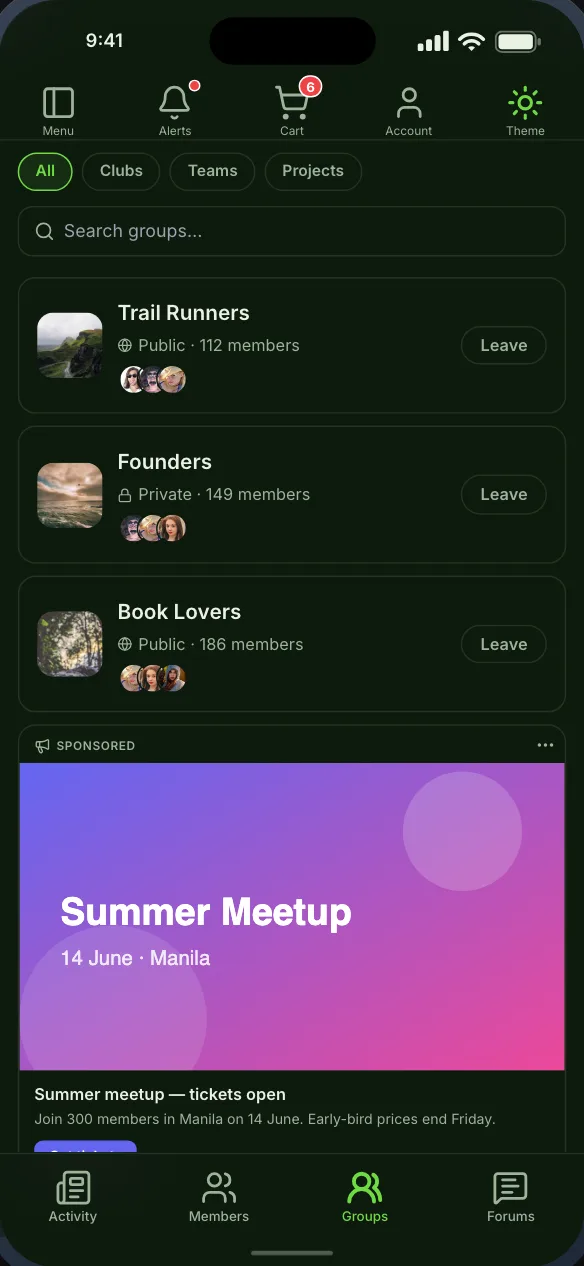
Groups

Browse, join and create groups, see the groups you belong to, and manage members and requests.

Connections

A member’s connections and the requests waiting on them, with accept and reject.

Messages

Private messages as a chat screen, with emoji, starring, push and a live typing indicator.

Notifications

Notifications, live, with push, and taps that open the screen they are about. Members choose which emails they get, from the app.

Members map

Members plotted on a real map from a location field on their profile, searchable by area or by distance.

Screenshots

The screens themselves

Captured from the app the builder previews, not drawn for this page. Each one can be seen in light or dark.
The BuddyPress activity stream, with the post composer, favourites and replies
The activity feed, with the composer and replies
The BuddyPress member directory, with member-type filters and cover photos
The member directory, filtered by member type
BuddyPress groups, with group types, privacy and member counts
Groups, with their types and privacy

Getting started

From your site to your phone

Nothing on your BuddyBoss Platform setup changes, and members sign in with the accounts they already have.

  1. Step 1

    Install the Memberside plugin

    On your WordPress site, beside BuddyBoss Platform. It reads your plugins for the app and adds nothing to your pages.
  2. Step 2

    Place the screens

    Start from a starting layout or drag BuddyBoss Platform’s screens onto the navigation yourself, and see them in the live preview.
  3. Step 3

    Build and try it

    Put the build on your own phone, then ship it from your own Apple and Google accounts.

Questions

BuddyBoss Platform in the app

No. Memberside is a separate app builder that reads BuddyBoss Platform from your site. It is not made by BuddyBoss. If you are weighing the two, the comparison linked on this page sets them side by side, with sources.

Yes. BuddyBoss Platform replaces BuddyPress, so a site runs one or the other, and the same screens work on both.

The builder checks each component on your site and only offers the screens whose component is on, so the app never shows a screen that cannot load.

The Memberside plugin, beside BuddyBoss Platform. It reads your plugins for the app and adds nothing to your pages.

Often run alongside

BuddyBoss Platform is a trademark of its owner. Memberside is not affiliated with, endorsed by or connected to its maker; the name is used only to say which plugin the app reads.

See your BuddyBoss Platform site as an app

Start free, connect your WordPress site, and the screens fill from the plugins it already runs.