Add-on
Messages that arrive the moment they are sent
Realtime replaces the constant “anything new yet?” polling behind your chat, notifications and feeds with a single live connection — so updates appear instantly and your server stops doing the work.
Free while in beta. No credit card needed.
The problem
Your site is answering questions nobody asked
Every live feature in a WordPress community works by asking, over and over, whether anything has changed. Each of those questions is a full WordPress request, and nearly all of them come back empty.
every 4 seconds
An open chat asks again, and again
every 15 seconds
A feed re-downloads itself
every page, every visitor
The bell polls in the background
Two hundred members with chat and a feed open is thousands of requests a minute, all of them asking the same question. Realtime answers it once, when the answer changes.
What changes
Instant for members, quieter for your server
It arrives when it happens
Your server stops answering questions nobody asked
Kinder to phones
Your members’ messages never touch our servers
It degrades, it does not break
Your website too, not just the app
What goes live
One connection, every live surface
Members hold a single connection no matter how many of these you use — it is one socket per person, not one per screen.
Notifications
The notification centre and the unread bell badge, in the app and on your website.
Chat
Ultimate Member messaging, Better Messages and BuddyPress private messages — threads, the inbox and unread counts, plus Sent, Delivered and Seen ticks that change the moment a message is read.
News feed & comments
New posts announced as they land, with reactions and comment counts updating in place.
Group discussions
Ultimate Member group walls, delivered only to members who are allowed to read them.
BuddyPress activity
Sitewide and per-group activity streams.
These do not refresh on their own today, so here Realtime adds liveness rather than removing load.
Who’s online
A live green dot on the avatar of every member who has the app open, on every screen that shows members. Members can hide their own status, and blocked members never see each other.
Answered by the connection itself, so it costs your site no requests at all.
On memberside.app
See how busy your community gets
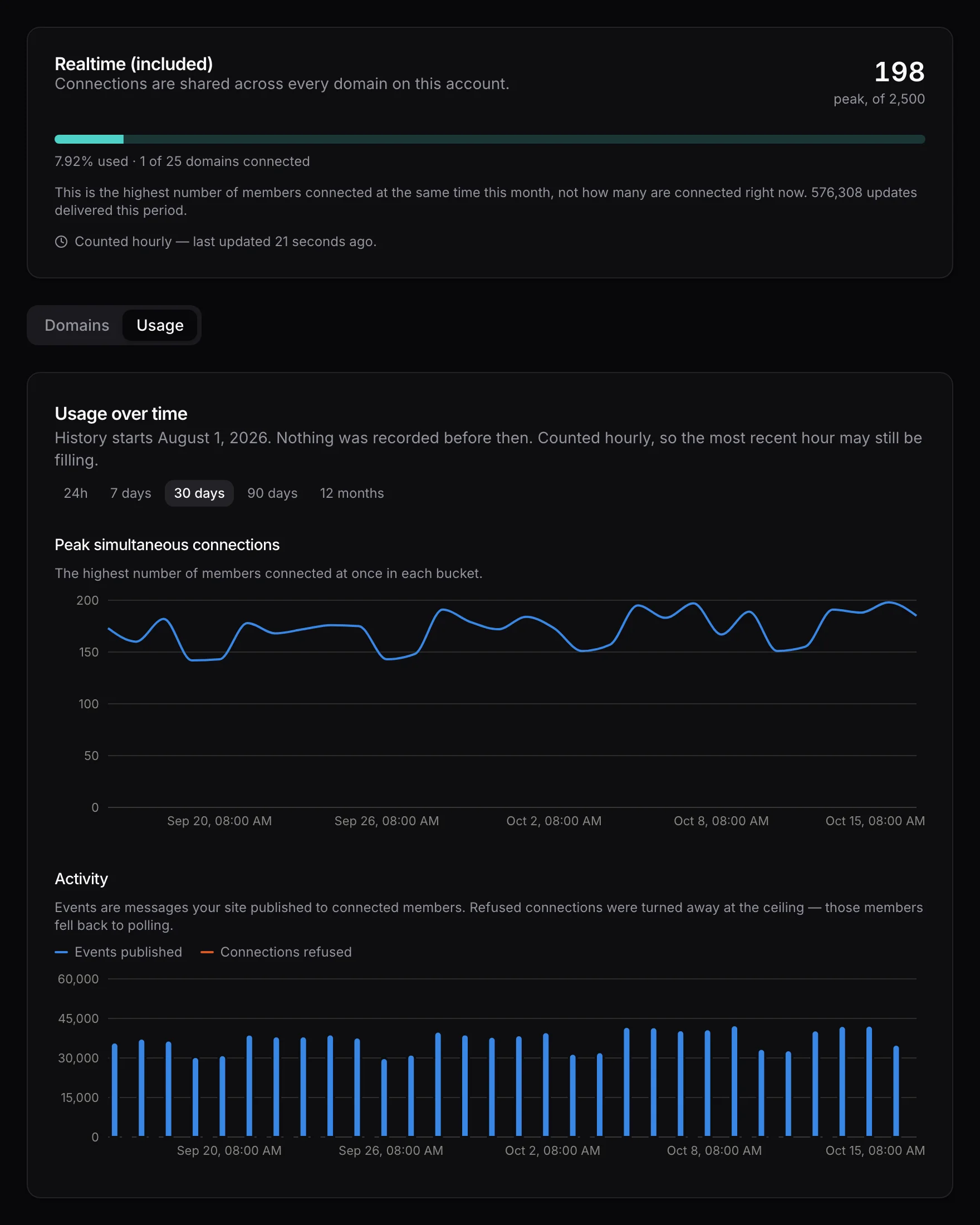
Your plan's ceiling, this month's peak of members connected at once, and how many updates your site sent — on your account page, beside the domains you have connected.
How it works
Three steps, then nothing to think about
- Step 1Step 1
Approve your domain
One click from your WordPress admin. The site gets its own credential — no keys to copy and nothing to paste into a config file. - Step 2Step 2
Your site announces changes
When a message is sent or a post appears, WordPress sends a short signal to the edge. It is fire-and-forget, so it never slows down the page your member is waiting on. - Step 3Step 3
Everyone sees it at once
Apps and browsers holding a connection update immediately. Anyone not connected carries on exactly as before.
Plans
Priced on how busy you are, not how much you say
Included with Pro at 200 connections and with Unlimited at 2,500; these tiers are for communities that outgrow what their plan includes. A plan is a ceiling on how many members are connected at the same moment — pooled across every domain you register, staging sites included.
Starter
A community where a few hundred people are around at once.
- 500 members connected at once
- Up to 10 domains, staging included
- Unlimited messages — no per-event charge
- Falls back to polling, never to an error
Growth
An active community with busy chat and a moving feed.
- 2,500 members connected at once
- Up to 25 domains, staging included
- Unlimited messages — no per-event charge
- Falls back to polling, never to an error
Scale
Several large communities, or one that never really sleeps.
- 10,000 members connected at once
- Up to 100 domains, staging included
- Unlimited messages — no per-event charge
- Falls back to polling, never to an error
Prices in USD, billed monthly, cancel any time. Account holders can subscribe from the Realtime page in the dashboard, so create a free account and connect your site first.
Questions