Add-on
The only thing that reaches a member who closed your app
Everything else in your app works for the people already inside it. Push is what brings back the ones who are not — a reply, a message, a mention, on their lock screen.
Free while in beta. No credit card needed.
The problem
Your community is talking to an empty room
A community app is only a community while people open it. Nothing inside it can ask somebody to come back, because reaching them means reaching a phone that is in a pocket.
the silent majority
Most of your community is not looking
answered in minutes, or never
A message with nobody to hear it
the quiet exit
Members do not leave, they drift
Realtime makes an open screen update instantly. It can do nothing at all for the member who closed the app yesterday — and that is the member you are losing.
What changes
A reason to open it again
Replies reach people who left
Tapping opens the right screen
Your keys stay yours
What gets sent
Only what already happened on your site
Notifications come from your own community's activity. Nothing here lets us — or anyone else — notify your members.
Notifications
Whatever your site already raises a bell for — replies, reactions, mentions, friend requests — reaches the member on their phone as well as in the app.
Built in. Several people reacting to the same post arrive as one notification, not five.
BuddyPress notifications
Mentions, replies, friend requests, group invitations and the rest can move from BuddyPress’s own notification list to your app — one event at a time, so nothing switches over in a single step.
Members are told once, not twice, and anyone who opted out of a BuddyPress email stays opted out.
Direct messages
A message notifies its recipient, titled with the sender’s name. Several messages in the same conversation replace one another rather than stacking up five banners.
Needs Better Messages. Members can switch chat notifications off without losing the rest.
Nothing you did not ask for
There is no broadcast tool, no marketing blast and no way for us to notify your members. Every notification comes from something that happened on your own site.
Campaigns and segments are on the roadmap, and are not part of this.
Being straight with you
What we run, and what we do not
Delivery to a phone belongs to Apple and Google. It is built into the operating systems and nobody sells an alternative — so here is exactly where the line falls.
What we run
- Which devices belong to which member, kept current as phones change.
- Sending, retrying a failure, and giving up sensibly.
- Removing a phone that was reset, so you stop paying to notify it.
- Collapsing five messages from one conversation into one banner.
- Your allowance, and a warning long before you reach it.
What Apple and Google run
- The last step: waking a closed app on a locked phone.
- Whether a notification is shown, and how it looks there.
We send to them directly with your credentials. On iOS that is Apple alone — your notifications do not pass through Google on their way to an iPhone.
On memberside.app
Your allowance, and how delivery is going
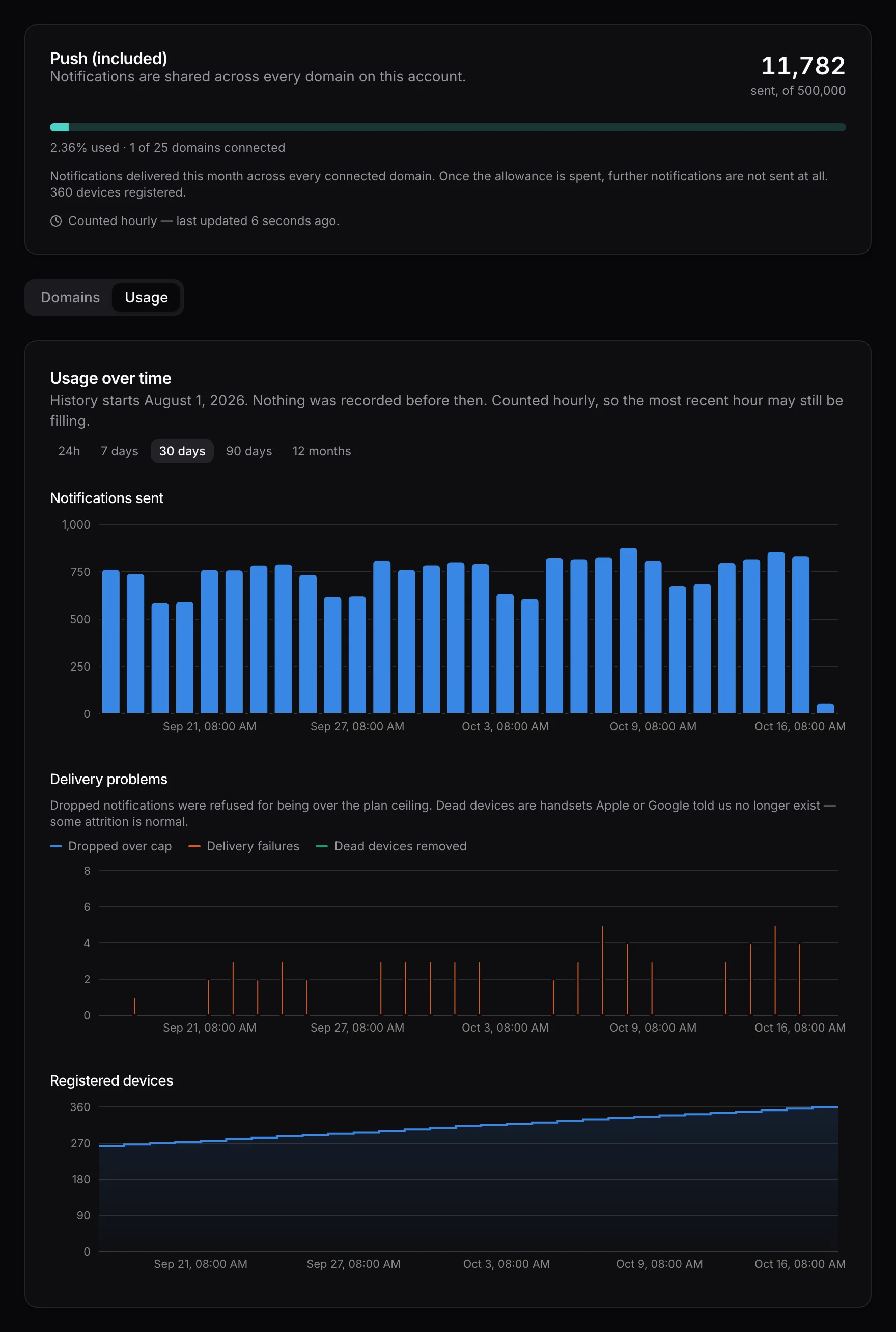
Notifications sent this month against your plan, the devices registered, and the ones that failed or were removed — on your account page, beside the domains you have connected.
How it works
Three steps, then nothing to think about
- Step 1Step 1
Add your credentials
An Apple push key for iOS, a Firebase service account for Android — or just one, if you ship one platform. They go into Memberside → API Keys on your own site. - Step 2Step 2
Authorize your domain
Open Memberside → Services → Push Notifications and choose Authorize. You approve the domain here and land back in WordPress connected. - Step 3Step 3
Rebuild your app
The next build registers each member’s device on launch. Nothing else to configure — no notification composer to learn, no audience to define.
Plans
Priced on how much you send
Included with Pro at 25,000 notifications a month and with Unlimited at 500,000. These tiers are for communities that outgrow what their plan includes — pooled across every domain you register, staging sites included.
Starter
A community of a few thousand, with an active notification bell.
- 100,000 notifications a month
- Up to 10 domains, staging included
- Unlimited devices per member
- Your own Apple and Firebase credentials
Growth
A busy community where chat carries most of the volume.
- 500,000 notifications a month
- Up to 25 domains, staging included
- Unlimited devices per member
- Your own Apple and Firebase credentials
Scale
Several large communities, or one that notifies constantly.
- 2,000,000 notifications a month
- Up to 100 domains, staging included
- Unlimited devices per member
- Your own Apple and Firebase credentials
Prices in USD, billed monthly, cancel any time. Account holders can subscribe from the Push page in the dashboard, so create a free account and connect your site first.
Questions