AppPresser alternative
Memberside vs AppPresser
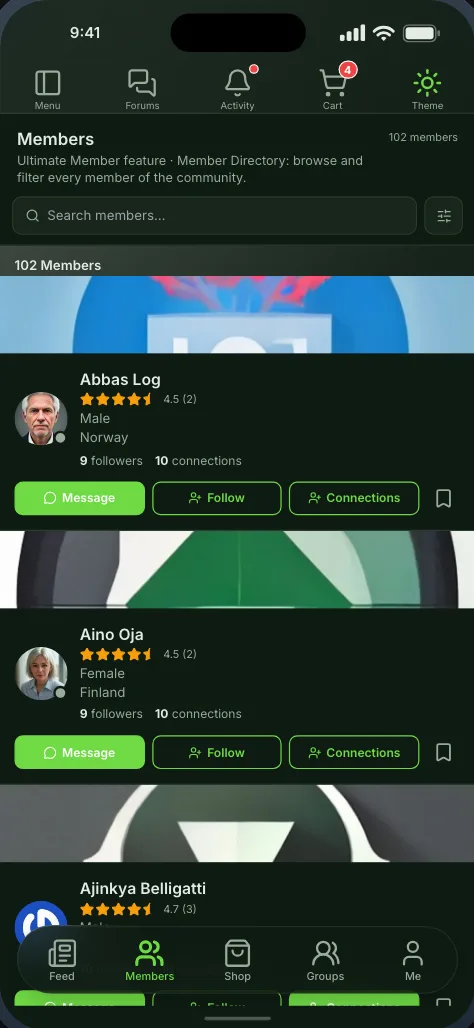
AppPresser builds a hybrid app: list screens read your site over its API, and other pages are your website inside the app. Memberside draws its screens natively in Flutter and reads Ultimate Member, which AppPresser does not list. Here is how the two compare, from each company’s own pages.
Free while in beta. No credit card needed.
Which one fits
Two good answers to different questions
Neither is the right choice for every site. This is the situation each one suits, before the detail.
Pick Memberside if
your site runs Ultimate Member, BuddyPress or the other plugins on our list, and you want native screens you arrange yourself.
You design it yourself on a drag-and-drop canvas, and every screen compiles to a Flutter widget, or its team sets it up and submits it as a paid service. Pages it has no screen for open as web pages inside the app.
Pick AppPresser if
you run LearnDash, BuddyPress or WooCommerce, want store submission handled for you, and want offline pages.
You build it in a customizer; they submit it to the stores. A hybrid app: list screens read your site over its API, and other pages are your website shown inside the app.
The difference
Where each one is ahead
Every row of the comparison where one product's answer is stronger than the other's. A row either company leaves unpublished counts for neither.
Side by side
Memberside and AppPresser, row by row
As each company describes its own product. The numbers link to the page each fact came from.
| Feature | Memberside | AppPresser |
|---|---|---|
| How it is built | ||
| Native screensDrawn by the app, not loaded as a web page | Yes[4]Flutter | Partly[11]Ionic hybrid; API lists plus web pages |
| Design screens yourselfArrange what a screen shows | Yes[4]Drag-and-drop canvas | Yes[10]Customizer and block page builder |
| Built for youA team does the setup | Extra cost[5]Paid setup and feature hours | Extra cost[9]Paid service hours |
| Your plugins in the app | ||
| Ultimate MemberProfiles, directories, extensions | Yes[2]Plus 24 extensions | No[9]Not on its supported list |
| BuddyPress | Yes[2] | Yes[13]AppCommunity, over the API |
| BuddyBoss Platform | Yes[2]Its bundled forums excepted | Yes[14]AppCommunity, over the API |
| LearnDash | Yes[2]Courses, lessons, quizzes | Yes[15]AppLMS extension |
| WooCommerce | Yes[6]Shop and cart; checkout on your site | Yes[16]Checkout in an in-app browser |
| Every other pluginWorks without a screen built for it | Partly[3]Opens as a web page in the app | Partly[12]Web pages in the app |
| Shipping and running it | ||
| iOS and Android | Yes[1]iOS with Pro, or a build pack on Free | Yes[9]Every plan |
| Store submission done for you | Extra cost[5]Paid service, in your own accounts | Yes[9]In your own accounts |
| Your branding onlyNo builder name in the app | Yes[1]Pro and up | Not published[9] |
| Push notifications | Yes[1]25,000 a month on Pro; extra cost on Free | Yes[9]10,000 devices on Standard |
| In-app purchases | Yes[6]Grants a member role or a WooCommerce product | Partly[9]One subscription, Advanced plan |
| Works offline | Yes[7]Saved screens and images, every plan | Yes[10]Offline pages and media |
| Buying it | ||
| Free plan | Yes[1]Android, 3 builds a month | No[9]14-day trial |
| Pay monthly | Yes[1] | Yes[9] |
| Refunds | No[8]Runs to the end of the period | Not published[9]Its pages disagree |
Cost
What one app costs
The first year, and three years with any renewal increase, from each pricing page.
- Memberside Pro$490
- AppPresser Standard$708
- Memberside Pro$1,470
- AppPresser Standard$2,124
- Memberside Pro:
- $490 a year, billed yearly ($49 a month otherwise). No renewal increase is published. Pro covers five apps; on Free, iOS builds need a build pack.[1]
- AppPresser Standard:
- $59 a month billed yearly, which waives the $199 setup fee ($79 a month plus setup otherwise). No renewal increase is published.[9]
One app on both stores, on the cheapest plan that does it, billed yearly where that is offered. Store fees (Apple $99 a year, Google $25 once) are the same for everyone and left out.
Work out your own with the cost calculator, or see every plan.
Moving over
Your site stays as it is
Memberside reads the plugins you already run, so nothing is migrated and members keep their accounts.
- Step 1Step 1
Install the Memberside plugin
On your WordPress site. It reads your plugins for the app and adds nothing to your pages. - Step 2Step 2
Start from a layout
Pick one of the starting layouts. It fills its screens from the plugins your site runs, and you arrange the rest on the canvas. - Step 3Step 3
Build and try it
Put the build on your own phone, then ship it from your own Apple and Google accounts.
What your plugins become in the app




Questions
Moving from AppPresser
Sources
Every fact about AppPresser comes from its maker’s own pages, read on the date shown. The full comparison, with AppMySite and MobiLoud as well, is in WordPress app builders compared. Spotted something out of date? Tell us and we will correct it.
- [1]Memberside — Pricing, read 11 October 2026
- [2]Memberside — Supported plugins, read 11 October 2026
- [3]Memberside — Product overview, read 11 October 2026
- [4]Memberside — Canvas, read 11 October 2026
- [5]Memberside docs — Managed services, read 12 October 2026
- [6]Memberside docs — Selling digital products in your app, read 11 October 2026
- [7]Memberside docs — Offline mode, read 12 October 2026
- [8]Memberside — Terms & Conditions, read 11 October 2026
- [9]AppPresser — Pricing and FAQ, read 11 October 2026
- [10]AppPresser — Features, read 11 October 2026
- [11]AppPresser — Announcing AppPresser 4, read 11 October 2026
- [12]AppPresser docs — WordPress pages in the app, read 11 October 2026
- [13]AppPresser — BuddyPress apps, read 11 October 2026
- [14]AppPresser — BuddyBoss apps, read 11 October 2026
- [15]AppPresser docs (AppLMS), read 11 October 2026
- [16]AppPresser — WooCommerce apps, read 11 October 2026
AppPresser is a trademark of its owner. Memberside is not affiliated with, endorsed by or connected to AppPresser or its maker; the name is used only to identify the product being compared.