Ultimate Member
Turn your Ultimate Member site into an app
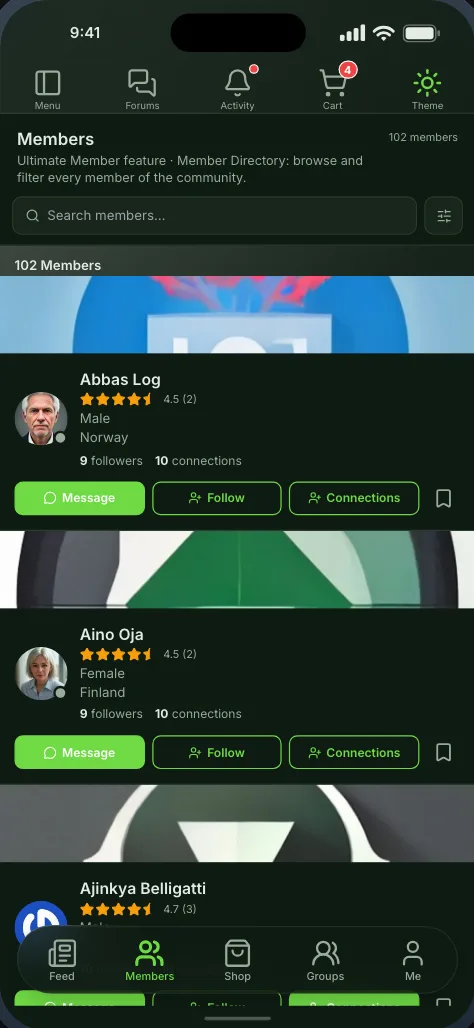
Memberside was built around Ultimate Member. Your member directories, profiles, forms and account pages become native screens, and the extensions you run, from followers and groups to photos and private messages, come with them.
Free while in beta. No credit card needed.
In the app
What Ultimate Member becomes
Native screens, drawn by the app from your site’s data, that you place on the bottom bar, the top bar or the side drawer.
Member directories
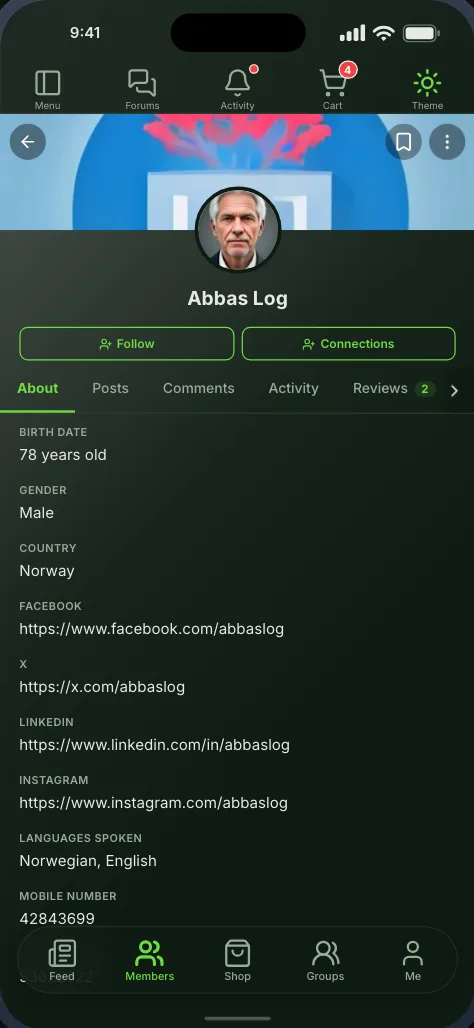
Profiles
Sign-in
Registration
Account settings
Screenshots
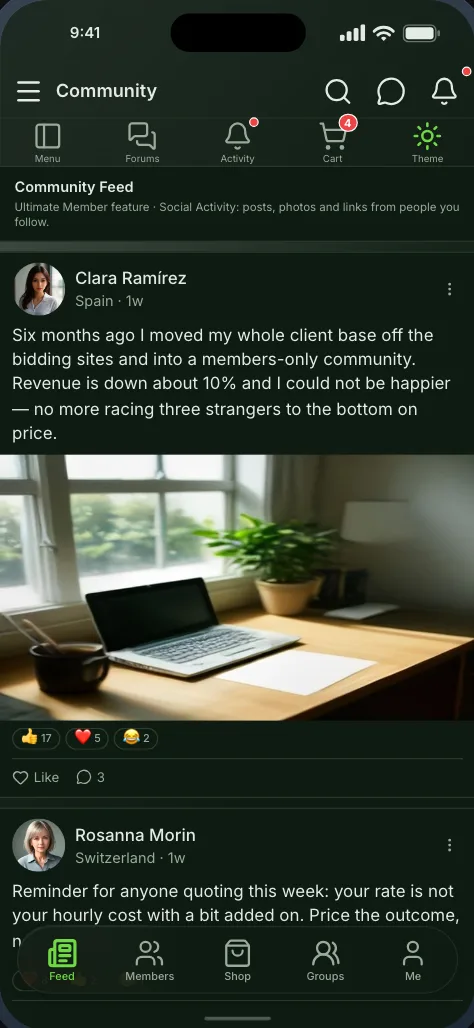
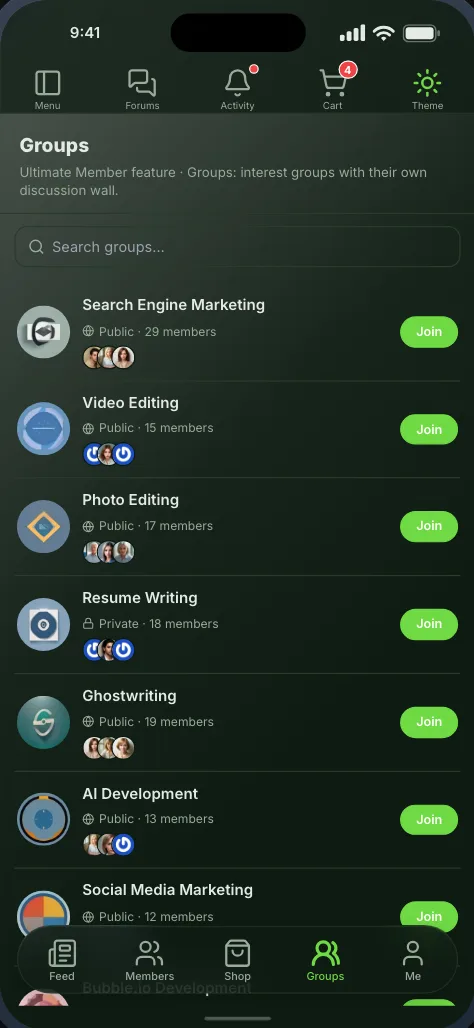
The screens themselves
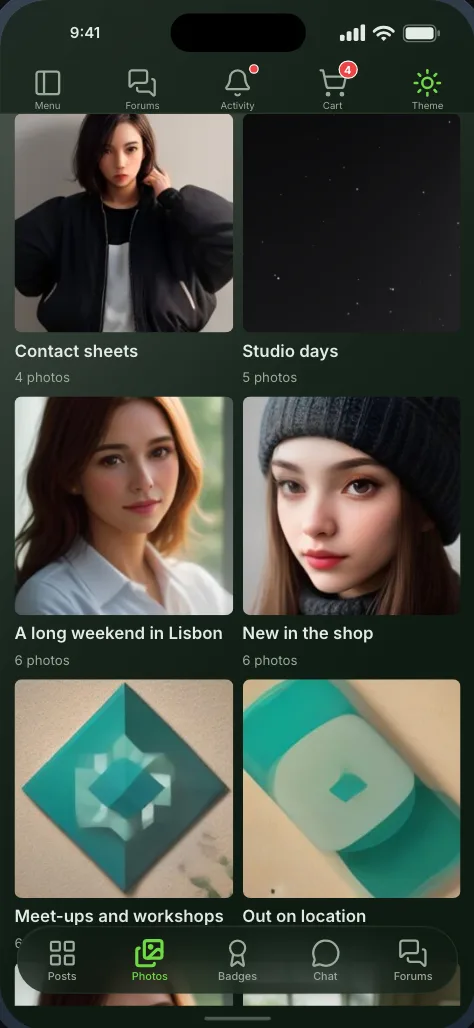
Captured from the app the builder previews, not drawn for this page. Each one can be seen in light or dark.
Extensions
With the Ultimate Member extensions you run
Each one is offered in the builder once it is active on your site, and stays hidden when it is not, so you never ship an empty screen.
- UM
Ultimate Member - Stripe
Payments
Memberships purchased on your website through the gateway you already use, recognised in the app on sign-in.
Ultimate Member - Private Messages
Chat
One-to-one conversations as a native inbox, with unread badges and a threaded conversation screen.
Ultimate Member - User Locations
Maps
Members on a real map, plotted from the location on their profile. Pan to search an area, or find who is within a distance of you.
Ultimate Member - Social Activity
News feed
The community wall as a native feed — reactions, comments, link previews and posting with photos from the camera roll.
Ultimate Member - Groups
Groups
Browse groups, join them, read a group discussion wall and create groups from inside the app.
Ultimate Member - Events
Events
Your community calendar and event pages, reachable from any navigation bar.
Ultimate Member - Followers
Connections
Follower and following lists, with live counts on the profile tabs they belong to.
Ultimate Member - Friends
Connections
Friend lists and connection requests, on profiles and as their own screens.
Ultimate Member - User Reviews
Reviews
Star ratings members leave each other — written and read right on a member’s profile, with replies, reporting, and a screen for the reviews you wrote.
Ultimate Member - Profile Completeness
Profiles
Walks members through the profile fields their role still wants, and can hold the app closed until they finish.
Ultimate Member - User Notes
Notes
Private and shared notes, including a create-note screen that respects your privacy rules.
Ultimate Member - User Photos
Photos
Photo albums with native upload, reordering, likes and comments — plus a one-tap download of everything a member has posted.
Ultimate Member - Social Login
Sign-in
The Social Connect tab, native: members see which accounts are linked and connect or disconnect one without leaving the app.
Ultimate Member - User Tags
Tags
Tags show as badges on a profile, and tapping one opens your member directory filtered to everyone who shares it.
Ultimate Member - User Bookmarks
Bookmarks
Saved posts and saved members, organised into public or private folders — plus a save control on articles, post and product cards, directory rows and member profiles.
Ultimate Member - Real-time Notifications
Notifications
Optional. Notifications are built in, across every plugin here — but where you already run this extension, your existing history is carried over and its web notification centre keeps working.
Ultimate Member - Notices
Announcements
The announcements you write for members, as a dismissible banner over the app and a screen of their own — targeted by role, by member, or by what someone has not filled in yet.
Ultimate Member - Verified Users
Trust
Verification marks carried through to native profiles and directory rows.
Ultimate Member - Online Users
Presence
Who is online now, as a directory filter and a screen of its own.
Ultimate Member - Profile Tabs
Profiles
Your custom profile tabs, in the order you set them. A tab with a form renders that form, and one linking to a post, page or custom post type opens it natively — only a link to another website opens in place.
Ultimate Member - Private Content
Profiles
The private content written for a member, or for their role, on their own profile — theirs and an administrator’s to read, nobody else’s.

Getting started
From your site to your phone
Nothing on your Ultimate Member setup changes, and members sign in with the accounts they already have.
- Step 1Step 1
Install the Memberside plugin
On your WordPress site, beside Ultimate Member. It reads your plugins for the app and adds nothing to your pages. - Step 2Step 2
Place the screens
Start from a starting layout or drag Ultimate Member’s screens onto the navigation yourself, and see them in the live preview. - Step 3Step 3
Build and try it
Put the build on your own phone, then ship it from your own Apple and Google accounts.
Questions
Ultimate Member in the app
Often run alongside


Ultimate Member is a trademark of its owner. Memberside is not affiliated with, endorsed by or connected to its maker; the name is used only to say which plugin the app reads.