LearnDash LMS
Turn your LearnDash courses into an app
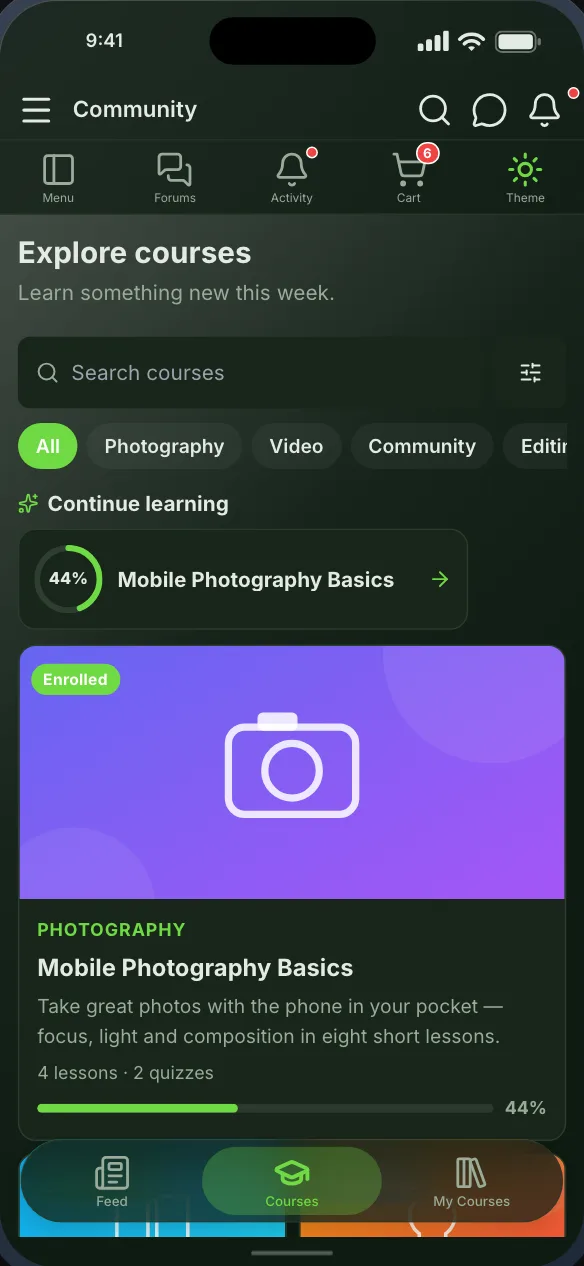
Members browse your LearnDash courses, read and complete lessons, and take quizzes as native screens, every question type graded and recorded by LearnDash itself. Progress on the phone is progress on your site.
Reads the LearnDash LMS you already run. Nothing to migrate.
Free while in beta. No credit card needed.
In the app
What LearnDash LMS becomes
Native screens, drawn by the app from your site’s data, that you place on the bottom bar, the top bar or the side drawer.
Course catalogue
Your courses with their covers and categories. Open one to see its lessons and topics. Free courses enroll in the app; paid ones open your own course page, signed in.
Lessons and progress
Lessons and topics read and completed in the app, and My Courses with what a member is taking, how far they have got, and a Resume button.
Quizzes
Quizzes taken natively, every question type, graded by LearnDash on your site so the result is the one your website records.
Getting started
From your site to your phone
Nothing on your LearnDash LMS setup changes, and members sign in with the accounts they already have.
- Step 1Step 1
Install the Memberside plugin
On your WordPress site, beside LearnDash LMS. It reads your plugins for the app and adds nothing to your pages. - Step 2Step 2
Place the screens
Start from a starting layout or drag LearnDash LMS’s screens onto the navigation yourself, and see them in the live preview. - Step 3Step 3
Build and try it
Put the build on your own phone, then ship it from your own Apple and Google accounts.
Questions
LearnDash LMS in the app
Yes. Completing a lesson or a quiz in the app records it in LearnDash on your site, so a member can move between the app and your website and carry on where they left off.
Yes. Pin one course, lesson or quiz to a navigation item, so it opens straight from the tab bar or the side drawer.
A paid course opens your own course page inside the app, signed in, so it is bought the way it is on your website. Free courses enroll in the app with one tap.
Often run alongside
%20scale(2.7)'%3e%3cpath%20d='M11.5,1.9c-0.5,0-0.9,0.1-1.3,0.3l0.1-0.3c0,0,0.4-1.7-1.2-1.8C8.9,0,8.8,0.1,8.8,0.2L8.5,1.9%20C8,1.9,7.6,2,7.2,2.1l0.1-0.3c0,0,0.4-1.7-1.2-1.8C5.9,0,5.9,0.1,5.9,0.2L5,4.9c0,0.2-0.1,0.4-0.1,0.7c0,2,1.6,3.7,3.5,3.7%20c2,0,3.6-1.6,3.6-3.7c0-0.5-0.1-0.9-0.4-1.1c-0.3-0.3-0.9-0.2-1.1,0.1c-0.2,0.3-0.2,0.8-0.2,1c0,0.4-0.2,0.8-0.4,1.2%20C9.7,6.4,9.6,6,9.6,5.5c0-1.1,0.9-1.9,1.9-1.9c1,0,1.9,0.9,1.8,1.9c0,0.7-0.1,1.4-0.7,1.7c0,0-0.1,0.1-0.2,0.2%20c-0.1,0.1-0.1,0.2-0.1,0.2c-0.3,0.6-0.7,1-1.2,1.4c0,0-0.1,0.1-0.1,0.1c0,0,0.1,0.1,0.1,0.1c0.2,0,0,0,0.2,0c2,0,3.6-1.6,3.6-3.7%20C15,3.5,13.4,1.9,11.5,1.9z%20M6.6,5.5c0-0.9,0.7-1.7,1.5-1.9L7.9,4.9c0,0.2-0.1,0.4-0.1,0.7c0,0.7,0.2,1.3,0.5,1.9%20C7.4,7.4,6.6,6.6,6.6,5.5z'/%3e%3c/g%3e%3c/svg%3e)



LearnDash LMS is a trademark of its owner. Memberside is not affiliated with, endorsed by or connected to its maker; the name is used only to say which plugin the app reads.
See your LearnDash LMS site as an app
Start free, connect your WordPress site, and the screens fill from the plugins it already runs.