Contact Form 7
Contact Form 7 in your own native app
Your contact forms as native screens, sent through Contact Form 7 on your site with the same checks and the same email. With Flamingo, members see the messages they sent, and your team reads the inbox on their phones.
Free while in beta. No credit card needed.
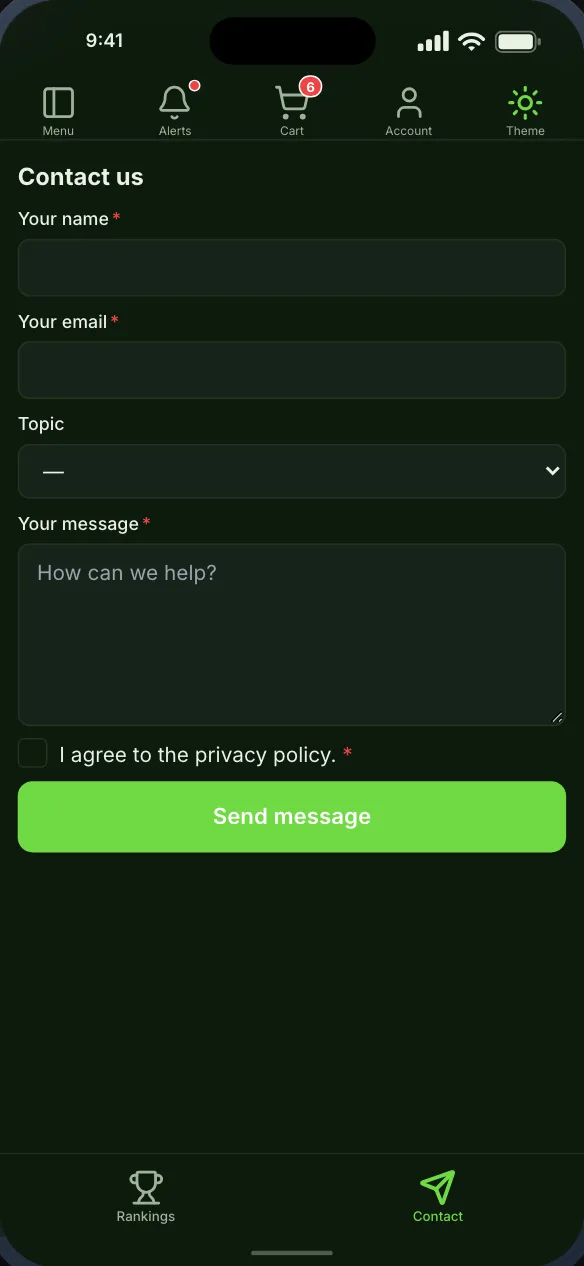
In the app
What Contact Form 7 becomes
Native screens, drawn by the app from your site’s data, that you place on the bottom bar, the top bar or the side drawer.
Contact forms
Messages, with Flamingo
Extensions
With the Contact Form 7 extensions you run
Each one is offered in the builder once it is active on your site, and stays hidden when it is not, so you never ship an empty screen.
Flamingo
Forms
With Flamingo keeping what Contact Form 7 receives, members see the messages they sent from the app, and the people who manage your inbox can read and delete everyone’s on their phone.

Getting started
From your site to your phone
Nothing on your Contact Form 7 setup changes, and members sign in with the accounts they already have.
- Step 1Step 1
Install the Memberside plugin
On your WordPress site, beside Contact Form 7. It reads your plugins for the app and adds nothing to your pages. - Step 2Step 2
Place the screens
Start from a starting layout or drag Contact Form 7’s screens onto the navigation yourself, and see them in the live preview. - Step 3Step 3
Build and try it
Put the build on your own phone, then ship it from your own Apple and Google accounts.
Questions
Contact Form 7 in the app
Often run alongside

'/%3e%3cg%20filter='url(%23filter0_d_84_8417)'%3e%3cpath%20d='M181.129%20168.663H162.596V94.0793H211.999V111.447H181.129V124.756H210.225V141.692H181.129V168.666V168.663Z'%20fill='white'/%3e%3cpath%20opacity='0.05'%20d='M157.707%20137.362H176.077C173.359%20156.345%20157.4%20168.9%20138.066%20168.9C116.894%20168.9%2099.6553%20153.029%2099.6553%20131.657C99.611%20126.686%20100.574%20121.759%20102.487%20117.174C104.4%20112.589%20107.222%20108.441%20110.781%20104.984C118.088%2097.8862%20127.896%2093.9739%20138.066%2094.1001C157.221%2094.1001%20173.626%20106.752%20175.958%20125.431H157.607C152.089%20104.272%20117.707%20106.341%20117.707%20131.657C117.707%20156.975%20152.52%20158.84%20157.707%20137.368V137.362Z'%20fill='%23002447'/%3e%3cpath%20d='M153.948%20137.362C150.796%20148.042%20139.579%20154.392%20128.538%20151.733C117.49%20149.064%20110.568%20138.354%20112.862%20127.467C115.152%20116.577%20125.835%20109.402%20137.058%20111.219C141.656%20111.843%20145.896%20114.048%20149.055%20117.456C151.239%20119.711%20152.877%20122.438%20153.845%20125.428H171.659C169.327%20106.706%20152.877%2094.1003%20133.767%2094.1003C123.596%2093.9705%20113.785%2097.8807%20106.476%20104.978C102.914%20108.436%20100.091%20112.585%2098.1774%20117.173C96.2641%20121.76%2095.3012%20126.69%2095.3473%20131.663C95.3473%20153.035%20112.485%20168.9%20133.773%20168.9C153.092%20168.9%20169.005%20156.345%20171.772%20137.362H153.945H153.948Z'%20fill='white'/%3e%3cpath%20opacity='0.05'%20d='M98.5881%20157.812H72.7959L68.5796%20168.65H48.8418L79.0475%2094H92.2121L123.619%20168.675H102.78L98.582%20157.812H98.5881ZM80.1274%20139.334L79.4813%20141.019H92.0028L91.569%20139.754L85.739%20123.746L80.1274%20139.334Z'%20fill='%23002447'/%3e%3cpath%20d='M93.7039%20157.812H67.9541L63.7408%20168.65H44L74.2088%2094H87.3733L118.78%20168.675H97.9505L93.7039%20157.812ZM75.2856%20139.334L74.6425%20141.019H87.164L86.7272%20139.754L80.9002%20123.746L75.2886%20139.334H75.2856Z'%20fill='white'/%3e%3c/g%3e%3cdefs%3e%3cfilter%20id='filter0_d_84_8417'%20x='36'%20y='86'%20width='183.999'%20height='90.8997'%20filterUnits='userSpaceOnUse'%20color-interpolation-filters='sRGB'%3e%3cfeFlood%20flood-opacity='0'%20result='BackgroundImageFix'/%3e%3cfeColorMatrix%20in='SourceAlpha'%20type='matrix'%20values='0%200%200%200%200%200%200%200%200%200%200%200%200%200%200%200%200%200%20127%200'%20result='hardAlpha'/%3e%3cfeOffset/%3e%3cfeGaussianBlur%20stdDeviation='4'/%3e%3cfeColorMatrix%20type='matrix'%20values='0%200%200%200%200%200%200%200%200%200.141176%200%200%200%200%200.278431%200%200%200%200.1%200'/%3e%3cfeBlend%20mode='normal'%20in2='BackgroundImageFix'%20result='effect1_dropShadow_84_8417'/%3e%3cfeBlend%20mode='normal'%20in='SourceGraphic'%20in2='effect1_dropShadow_84_8417'%20result='shape'/%3e%3c/filter%3e%3cradialGradient%20id='paint0_radial_84_8417'%20cx='0'%20cy='0'%20r='1'%20gradientUnits='userSpaceOnUse'%20gradientTransform='rotate(45)%20scale(362.039)'%3e%3cstop%20stop-color='%230ECAD4'/%3e%3cstop%20offset='1'%20stop-color='%23006BD6'/%3e%3c/radialGradient%3e%3c/defs%3e%3c/svg%3e)

Contact Form 7 is a trademark of its owner. Memberside is not affiliated with, endorsed by or connected to its maker; the name is used only to say which plugin the app reads.