Site Reviews
Site Reviews in your own native app
The reviews people leave about your site, products or services, as native screens: browse, filter and sort them, see the rating breakdown, read them by category, and write, edit or delete your own, including the ones still waiting for approval.
Reads the Site Reviews you already run. Nothing to migrate.
Free while in beta. No credit card needed.
In the app
What Site Reviews becomes
Native screens, drawn by the app from your site’s data, that you place on the bottom bar, the top bar or the side drawer.
Reviews
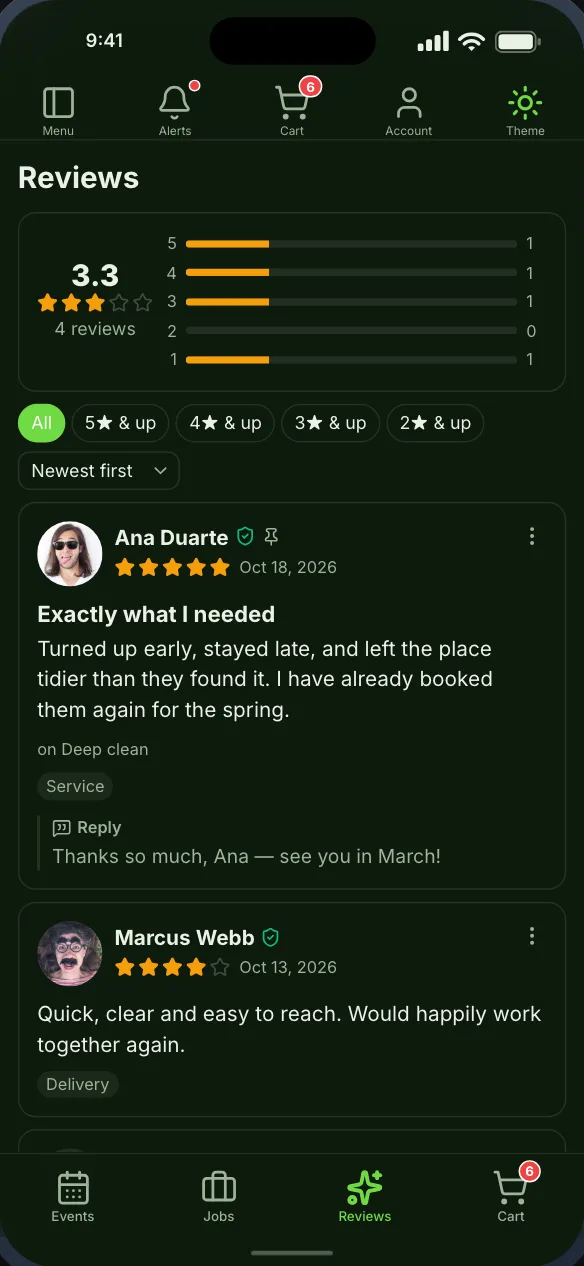
Every review with the average and a bar per star level, rating filters, sorting, your replies and the verified badge. Tap one to read it in full.
Write a review
The review form, asking for exactly what your site will accept.
My reviews
Everything a member has written, and the only place they can see a review your site is still holding.
Review categories
Your review categories, each with its own rating, opening the reviews inside it.
Getting started
From your site to your phone
Nothing on your Site Reviews setup changes, and members sign in with the accounts they already have.
- Step 1Step 1
Install the Memberside plugin
On your WordPress site, beside Site Reviews. It reads your plugins for the app and adds nothing to your pages. - Step 2Step 2
Place the screens
Start from a starting layout or drag Site Reviews’s screens onto the navigation yourself, and see them in the live preview. - Step 3Step 3
Build and try it
Put the build on your own phone, then ship it from your own Apple and Google accounts.
Questions
Site Reviews in the app
No. User Reviews is for reviewing members; Site Reviews is for your site, products or services. A site can run both, and their screens are separate.
Yes. Reviews assigned to a member show on that member’s profile too.
Often run alongside


Site Reviews is a trademark of its owner. Memberside is not affiliated with, endorsed by or connected to its maker; the name is used only to say which plugin the app reads.
See your Site Reviews site as an app
Start free, connect your WordPress site, and the screens fill from the plugins it already runs.